On This Page
AI Agents in Production: From Demo to Deployment in 2026
Learn the architecture, frameworks, and reliability patterns needed to deploy AI agents in production. Covers LangGraph, CrewAI, multi-agent systems, and more.

In January 2026, a software engineer at a mid-stage fintech startup pushed a pull request that refactored an entire payments microservice (47 files changed, 2,300 lines added, 1,800 removed). The PR passed all 312 unit tests, included migration scripts, and came with a detailed summary explaining each architectural decision. The author was not a human. It was a coding agent running Claude, orchestrated through a custom pipeline that read the ticket from Linear, cloned the repo, planned the changes, implemented them across multiple files, ran tests in a loop until they passed, and opened the PR with a structured description. A human reviewed it, requested two minor changes, and merged it the same afternoon.
This is not a parlor trick anymore. This is Tuesday.
AI agents (systems where a language model operates in a loop, perceiving its environment, reasoning about what to do, and taking actions with real-world side effects) have crossed the threshold from impressive demo to daily production tool. But the gap between "works in a notebook" and "runs reliably at scale" remains enormous. This article is a practitioner's guide to that gap: what changed to make agents viable, how the major frameworks compare, what architectural patterns actually work, and where the sharp edges still are.
What Changed: Why Agents Work Now
The concept of an AI agent is not new. The ReAct (Reasoning + Acting) paper from Yao et al. landed in late 2022. Tool-use patterns were explored throughout 2023. So why did 2025 become the year agents went from research curiosity to production workload?
Three things converged.
1. Models Got Good Enough at Following Instructions Over Long Horizons
Early agent experiments with GPT-3.5 and even GPT-4 suffered from a consistent failure mode: the model would lose the thread. After 8-10 tool calls, it would start repeating itself, forget its objective, or hallucinate tool outputs. The generation of models released from late 2024 onward, progressing through Claude 3.5 Sonnet and GPT-4o to the current Claude 4.5/4.6/4.7, GPT-5.x, and Gemini 3.x families, along with reasoning-focused models like o1, o3, and Claude's extended thinking capabilities, dramatically improved long-horizon coherence. Reasoning models are the brains behind capable agents. A model that can maintain a coherent plan across 50+ steps and recover from unexpected tool outputs is qualitatively different from one that drifts after 10.
2. Tool Integration Became Standardized
In 2023, every agent framework invented its own tool-calling format. By late 2025, the ecosystem converged on a handful of standards. Anthropic's Model Context Protocol (MCP) emerged as the most significant unifying layer, providing a standardized way for models to discover and invoke tools, read resources, and interact with external systems through a common protocol. Agents rely on MCP for tool integration: see The MCP Revolution. OpenAI's function calling API, while proprietary, also matured into a reliable interface. The practical effect: you can now give an agent access to 30 tools without writing 30 bespoke adapters.
3. Infrastructure Caught Up
Running an agent in production means running a model in a loop, potentially dozens of inference calls per task and often with large context windows. This was prohibitively expensive and slow in 2023. By 2026, inference costs have dropped by roughly 10-50x depending on the provider, latency for mid-tier models is sub-second, and caching strategies (prompt caching, KV-cache sharing) make repeated calls within an agent loop far cheaper. Serving agents at scale requires inference optimization. The economic equation flipped: for many tasks, an agent that takes 60 seconds and $0.15 in API calls is cheaper than 30 minutes of an engineer's time.
The Agent Architecture: Perception, Reasoning, Action
Every production agent, regardless of framework, implements some variation of the same core loop:
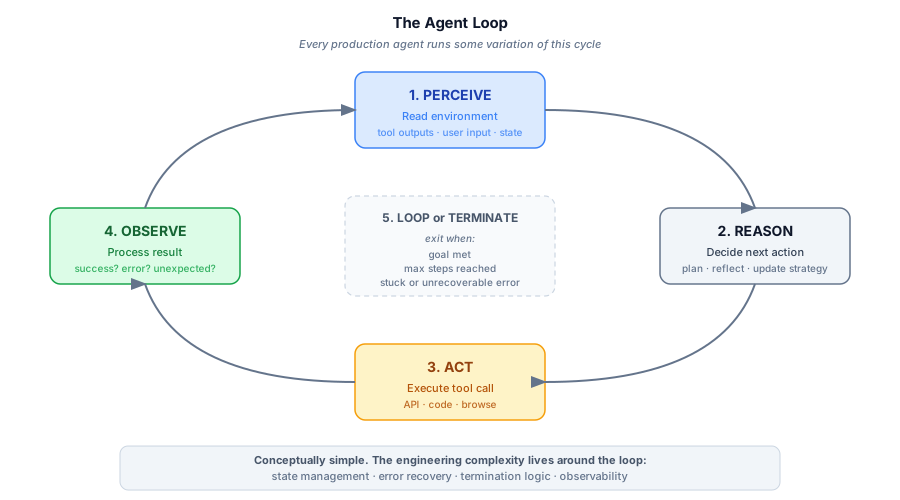
This is conceptually simple. The engineering complexity lies in everything around this loop:
- State management: What does the agent remember between steps? How do you handle context window limits when a 20-step task generates 50K tokens of tool output?
- Error recovery: What happens when a tool call fails? When the model hallucinates a tool that does not exist? When the output is ambiguous?
- Termination: How does the agent know when it is done? How do you prevent infinite loops?
- Observability: How do you debug a 35-step agent trace when something goes wrong at step 22?
The frameworks differ primarily in how they answer these questions.
Framework Landscape: LangGraph, CrewAI, AutoGen, and OpenAI Assistants
The agentic AI framework space has been remarkably volatile, but by early 2026 the field has consolidated around a few serious contenders. Here is an honest assessment of each.
LangGraph
What it is: A graph-based agent orchestration framework from LangChain. Agents are defined as state machines where nodes are computation steps (LLM calls, tool executions, conditional logic) and edges define transitions.
Strengths:
- The graph abstraction is genuinely powerful for complex workflows. You can define conditional branching, parallel execution, human-in-the-loop checkpoints, and cyclic loops with explicit control.
- State is a first-class concept. You define a typed state object that flows through the graph, making it easy to persist, inspect, and resume agent runs.
- LangGraph Platform provides deployment infrastructure including persistence, streaming, and a studio UI for debugging.
- Strong support for "plan-and-execute" patterns where a planner agent creates a task list and an executor works through it.
Weaknesses:
- The abstraction can feel heavy for simple agents. A straightforward "call model, use tool, loop" pattern requires more boilerplate than it should.
- The LangChain ecosystem's rapid API churn has burned developers before. LangGraph is more stable, but the memory is fresh.
- Debugging graph execution requires tooling: vanilla print statements will not cut it.
Best for: Complex, multi-step workflows with branching logic, human approval gates, and the need for persistent state. Teams that want fine-grained control over agent behavior.
from langgraph.graph import StateGraph, MessagesState

# Define the graph
builder = StateGraph(MessagesState)
builder.add_node("agent", call_model)
builder.add_node("tools", tool_executor)
builder.add_edge("agent", should_continue)  # conditional routing
builder.add_edge("tools", "agent")          # loop back after tool use
graph = builder.compile(checkpointer=memory)
CrewAI
What it is: A framework focused on multi-agent collaboration, where you define "agents" with roles, goals, and backstories, then organize them into "crews" that work together on tasks.
Strengths:
- The mental model is immediately intuitive. Defining an agent as "You are a senior data analyst who excels at finding patterns in financial data" and giving it a task feels natural.
- Built-in support for sequential, parallel, and hierarchical task execution.
- Lower barrier to entry than LangGraph; you can have a working multi-agent system in 30 lines of Python.
- CrewAI Flows added more structured orchestration in late 2025, bridging the gap toward LangGraph's control flow.
Weaknesses:
- The "role-playing" abstraction can obscure what is actually happening. Under the hood, it is still prompt engineering, and the agent "personalities" can interact in unpredictable ways.
- Less fine-grained control over the execution loop compared to LangGraph.
- Scaling beyond 3-4 agents in a crew can lead to confused, circular conversations where agents rehash the same points.
Best for: Teams that want to get multi-agent workflows running quickly, especially for knowledge work (research, analysis, content generation).
OpenAI Assistants API
What it is: OpenAI's managed agent infrastructure, where you create persistent assistants with instructions, tools, and file access, then run them against conversation threads.
Strengths:
- Fully managed: no infrastructure to run. State persistence, file handling, and tool execution are handled by OpenAI.
- Code Interpreter and File Search are built-in tools that work remarkably well.
- The Responses API (successor to Chat Completions for agentic use cases) added native support for multi-turn tool use, web search, and computer use.
Weaknesses:
- Vendor lock-in to OpenAI models. You cannot swap in Claude or Gemini.
- Less control over the execution loop. You are trusting OpenAI's orchestration logic.
- Pricing can be opaque: token storage, retrieval, and code execution all add up.
- The managed nature means less visibility into what is happening and harder debugging.
Best for: Teams that want to ship fast without managing agent infrastructure and are committed to the OpenAI ecosystem.
Choosing a Framework: A Decision Matrix
| Factor | LangGraph | CrewAI | OpenAI Assistants |
|---|---|---|---|
| Control over execution | High | Medium | Low |
| Multi-agent support | Good | Excellent | Limited |
| Ease of getting started | Medium | High | High |
| Model flexibility | Any model | Any model | OpenAI only |
| Production readiness | High | Medium-High | High |
| Debugging/Observability | Good (with Studio) | Basic | Limited |
Computer-Use Agents: The GUI Frontier
By late 2025, agents operating graphical user interfaces had moved from research demo to shipping product: clicking buttons, filling forms, navigating websites, and using desktop applications without requiring a dedicated API integration for each one.
Anthropic's Computer Use
Anthropic shipped computer use capabilities with Claude, allowing the model to take screenshots, analyze what it sees, and emit mouse clicks and keyboard inputs. The model literally sees the screen as an image and decides where to click. This launched initially as a research preview but rapidly matured. The significance is architectural: instead of needing a dedicated API integration for every application, a computer-use agent can interact with any software that has a GUI. Need to file an expense report in your company's ancient internal tool? The agent can navigate it visually.
OpenAI Operator
OpenAI's Operator took a similar approach, providing a browser-based agent that can navigate websites, fill out forms, and complete multi-step web tasks. It runs in a managed browser environment and can handle common tasks like booking restaurants, ordering groceries, or navigating web applications.
Google's Project Mariner
Google's approach through Project Mariner (built on Gemini) focused specifically on browser-based tasks, leveraging Chrome integration to provide agents that can understand and interact with web pages. Its advantage is deep integration with the Chrome rendering engine, giving it more reliable page understanding than screenshot-based approaches.
The Reality Check on Computer Use
Computer-use agents are fragile in ways that compound quickly in production:
- Speed: They are slow. Each action requires a screenshot, a model inference, and a UI interaction. A task a human does in 30 seconds might take an agent 3-5 minutes.
- Reliability: UI elements move, layouts change, pop-ups appear. Agents that worked yesterday break today because a website redesigned its checkout flow.
- Security: Giving an agent the ability to click anything on a screen is a significant security surface. Prompt injection through rendered web content is a real threat.
- Cost: Each screenshot-and-decide cycle costs tokens. A 50-step web task at high-resolution screenshots adds up quickly.
Computer use is best understood as a fallback integration method: use it when there is no API, no MCP server, and no other structured interface available. For any system you control, a proper tool integration will be faster, cheaper, and more reliable.
Coding Agents: The First Production Success Story
If you ask "where are agents actually working in production today?", the clearest answer is software development. The most visible agent application today is Vibe Coding.
Coding agents have a structural advantage over other agent applications: the environment is inherently verifiable. An agent can write code, run tests, see if they pass, read error messages, and iterate. The feedback loop is tight, objective, and automated. Compare this to, say, a marketing agent where "did this email perform well?" requires days of real-world data.
The Coding Agent Architecture
Most production coding agents follow a common pattern:
- Task ingestion: Read a ticket, issue, or natural language description of the desired change.
- Codebase understanding: Use tools to search the codebase, read relevant files, understand the project structure, and identify the files that need to change.
- Planning: Generate a step-by-step plan for the implementation.
- Implementation: Make changes across multiple files, following the plan but adapting as needed.
- Verification: Run tests, linters, and type checkers. If they fail, read the errors and iterate.
- Output: Create a PR, write a description, and flag areas of uncertainty for human review.
Tools like Claude Code, Cursor, GitHub Copilot Workspace, Devin, and others implement variations of this loop. The key insight is that steps 2-5 often run multiple times: the agent might realize during implementation that its plan was wrong, go back to reading more code, revise the plan, and try again. This self-correction capability is what separates useful coding agents from fancy autocomplete.
What Makes Coding Agents Reliable
The coding agents that work well in practice share several properties:
- Rich tool access: File read/write, terminal execution, search (both text and semantic), git operations, and browser access for documentation.
- Iterative verification: They do not just write code and hope: they run it, check the output, and fix issues in a loop.
- Scoped context: They do not try to hold the entire codebase in context. They search for what they need, read specific files, and maintain a working set.
- Human-in-the-loop at the right points: They ask for clarification when genuinely uncertain rather than guessing, and they produce artifacts (PRs, diffs) that humans can review before anything hits production.
The lesson generalizes, but carefully. The insight is not "only use agents on already-solved problems." Agents are a reasonable choice for complex, partially-unsolved workflows. The point is that they require the same scientific discipline as any model: a hypothesis, an eval harness, and a baseline to beat. The narrower non-agentic alternative with equivalent tool access is almost always a stronger baseline than teams assume. Measure both. An agent that beats a well-chosen baseline on a rigorous eval is a real result. An agent that ships without one is a demo that survived the screencast.
Reliability Patterns for Production Agents
Here is where we get concrete. If you are building an agent for production use, these patterns will save you from the most common failure modes.
Pattern 1: Structured Output for Tool Calls
Never let the model emit tool calls as free-form text that you parse with regex. Use the model's native tool-calling / function-calling capabilities, or at minimum constrained generation (like JSON mode). Free-form tool calls are the number one source of agent failures in the wild.
# Bad: parsing tool calls from free text
response = model.generate("Use the search tool to find...")
tool_call = parse_tool_from_text(response)  # fragile regex parsing

# Good: native tool calling
response = model.generate(
    messages=messages,
    tools=[search_tool, read_tool, write_tool],
    tool_choice="auto"
)
# tool_call is a structured object, not parsed text
Pattern 2: Retry with Escalation
Not all failures are equal. A transient API error should be retried silently. A tool that returns an unexpected format should be retried with a hint. A fundamental misunderstanding of the task should escalate to a human. Implement tiered error handling:
class AgentRetryPolicy:
    def handle_error(self, error, step, context):
        if is_transient(error):          # network timeout, rate limit
            return RetryAction(delay=exponential_backoff(step.retry_count))
        elif is_tool_error(error):       # unexpected output format
            return RetryAction(
                hint=f"Tool returned unexpected format: {error}. "
                     f"Try a different approach."
            )
        elif is_stuck(context):          # same error 3+ times
            return EscalateAction(
                summary=f"Agent stuck at step {step.number}: {error}",
                context=context.last_n_steps(5)
            )
Pattern 3: Guardrails as Separate Models
Do not rely on the agent's own model to enforce safety constraints. Use a separate, faster model (or a rules engine) to validate every action before execution:
- Input guardrails: Is this task within the agent's allowed scope?
- Output guardrails: Is the proposed action safe? Does the tool call target an allowed resource?
- Content guardrails: Does the generated content meet policy requirements?
This is defense in depth. The agent model may be manipulated through prompt injection in tool outputs. A separate guardrail model with a fixed, minimal prompt is much harder to subvert.
Pattern 4: Checkpointing and Resumability
Production agents will be interrupted (by timeouts, deployment restarts, or rate limits). Design for resumability from the start:
- Serialize agent state (conversation history, current step, accumulated results) to persistent storage after every step.
- On restart, load the checkpoint and continue from where you left off.
- This also enables human-in-the-loop: pause the agent, let a human review the current state, then resume.
LangGraph's checkpointer abstraction handles this well. If you are building from scratch, a simple JSON state file per agent run goes a long way.
Pattern 5: Budgets and Circuit Breakers
Every production agent needs hard limits:
- Token budget: Maximum total tokens (input + output) per agent run. A runaway agent burning through your API budget is a real risk.
- Step budget: Maximum number of tool calls per run. Prevents infinite loops.
- Time budget: Wall-clock timeout for the entire run.
- Cost budget: Maximum dollar spend per run.
When any budget is exceeded, the agent should gracefully terminate and produce a summary of what it accomplished and what remains.
class AgentBudget:
    max_tokens: int = 500_000
    max_steps: int = 50
    max_time_seconds: int = 300
    max_cost_usd: float = 2.00

    def check(self, state: AgentState) -> bool:
        if state.total_tokens > self.max_tokens:
            raise BudgetExceeded("token", state.total_tokens, self.max_tokens)
        # ... check other limits
Pattern 6: Observability and Tracing
You cannot debug what you cannot see. Observability deserves more than a bullet list. It gets its own section below. The short version: structured tracing and evaluation are not optional infrastructure; they are how you find out your agent has been wrong for three weeks.
Observability: Understanding What Your Agent Did and Why
Traditional application observability tells you whether a request succeeded or failed, how long it took, and which line of code threw the exception. Agent observability needs to answer a different set of questions: Why did the agent call that tool at step 14? Why did it abandon the plan it started with? Which prompt change last Tuesday caused success rates to drop? And what does this 47-step run actually cost per task?
These questions are harder because agent execution is non-linear, stateful, and probabilistic. There is no stack trace when an agent confidently produces a wrong answer. The failure mode is not an exception. It is a plausible-sounding result that a downstream system or human might not catch.
What to Instrument
The minimum viable instrumentation for a production agent:
- Every LLM call: record the model, a hash of the prompt (or the full prompt if retention policy allows), the response, latency, input tokens, output tokens, and cost. This is the data you will need to debug regressions.
- Every tool call: record the tool name, inputs, outputs, and duration. Tool outputs are frequently where things go wrong: an API returns an unexpected schema, a search returns irrelevant results, a code execution silently exits 1.
- A trace ID per agent run: every step in the run shares a parent trace ID. Without this, you have logs; with it, you have a reconstructable execution history.
- Session and user IDs: in multi-tenant applications, these make per-user cost attribution and per-feature spend analysis straightforward rather than a weekend project.
- Step-level metadata: the agent's stated reasoning (if using chain-of-thought), the current plan, and the action taken. This is the data that makes "why did it do that?" answerable.
The Three-Layer Eval Model
Shipping an agent without an eval suite is like shipping a web service with no tests and no uptime monitoring. The field has converged on three complementary layers:
Unit evals test discrete, deterministic steps. Does the tool-selection logic pick the right tool given a specific input? Does the planning step produce a valid JSON structure? These are fast, cheap, and can run in CI.
LLM-as-judge evals handle the subjective quality signals that code cannot assess: Is this response accurate? Did the agent complete the actual goal of the task, or just the literal instruction? Is the tone appropriate? You run a faster, cheaper judge model (often GPT-5.x mini or Haiku) against a curated set of golden examples, comparing agent outputs before and after prompt or model changes. The key is building the golden set from real production traces (not synthetic inputs) so regressions reflect actual user scenarios.
Production sampling is continuous monitoring on live traffic. You cannot evaluate every agent run at scale, so you sample: flag runs that hit budget limits, had more than N retries, or took more than X seconds; run an LLM-as-judge pass on the flagged subset. Over time this surfaces systematic drift that your regression suite (fixed against a golden set) will miss.
OpenTelemetry as the Standard
The LLM observability ecosystem has largely converged on OpenTelemetry (OTel) as the underlying instrumentation layer. OTel-based instrumentation means your agent traces are vendor-portable: you can send them to LangSmith today and switch to a self-hosted Phoenix instance tomorrow without re-instrumenting your code. If you are building from scratch, start with OTel-compatible instrumentation rather than a vendor SDK.
Tooling Landscape
| Tool | Positioning | Best for |
|---|---|---|
| LangSmith | Managed, LangChain-native | LangGraph users; zero-config auto-instrumentation of chains and tool calls |
| Braintrust | Eval-first platform | Teams that want rigorous eval science; generous free tier (1M spans/month) |
| Arize Phoenix | Open source, OTel-based | Self-hosted; 50+ built-in metrics including faithfulness, hallucination, and toxicity |
| Langfuse | Open source baseline | Teams that want full data control without vendor lock-in |
| Datadog LLM Observability | Enterprise APM integration | Teams already on Datadog; native LLM-as-judge evaluations |
A common production setup: a gateway tool (Portkey or Helicone) for real-time cost tracking and routing, paired with an evaluation platform (Braintrust or Phoenix) for quality metrics. If you are using LangGraph, LangSmith is the path of least resistance: auto-instrumentation without touching your agent code.
One practical note: start logging before you need the logs. The most painful debugging sessions are the ones where something went wrong two weeks ago, before you set up tracing. Instrument on day one, even if you only look at the data on day thirty.
Multi-Agent Orchestration
Single agents hit a ceiling. When a task requires diverse expertise (researching a topic, writing code based on the findings, testing the code, and writing documentation), a single agent either needs an impossibly large tool set or its context window fills up with irrelevant information.
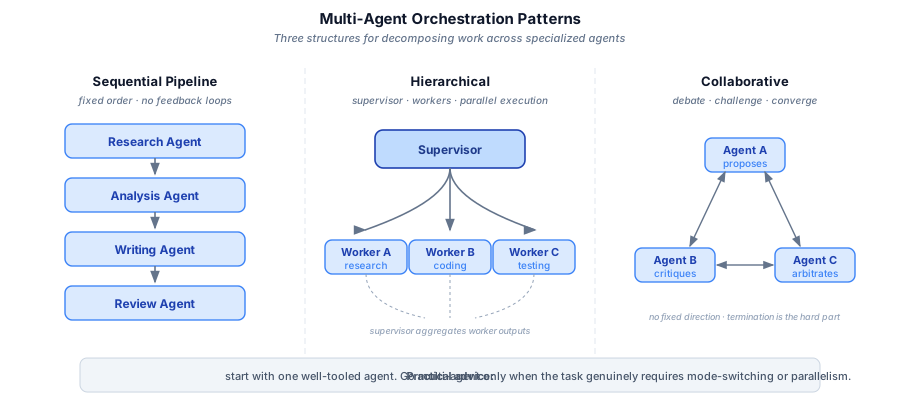
Multi-agent systems address this by decomposing work across specialized agents. The main orchestration patterns are shown below.
Sequential Pipeline
Agents execute in a fixed order. Agent A's output feeds into Agent B's input.
Pros: Simple, predictable, easy to debug. Cons: No parallelism, no feedback loops. If the Writing Agent discovers the Research Agent missed something, it cannot go back.
Hierarchical (Supervisor/Worker)
A supervisor agent receives the task, breaks it into subtasks, delegates to worker agents, and synthesizes their outputs.
Pros: Natural decomposition, the supervisor can re-delegate if a worker fails, enables parallelism. Cons: The supervisor is a single point of failure. If it misunderstands the task, all workers go in the wrong direction. Supervisor agents also consume significant tokens just managing the workflow.
Collaborative (Debate/Discussion)
Multiple agents discuss a problem, challenge each other's outputs, and converge on a solution.
Pros: Excellent for tasks where multiple perspectives improve quality (code review, risk analysis, creative work). Cons: Conversations can go in circles. Without strong termination conditions, agents will debate indefinitely. Token costs scale rapidly with the number of participants.
The Practical Advice
Start with a single agent. Seriously. Most tasks that seem to need multi-agent orchestration can be handled by one well-tooled agent with a good system prompt. Only introduce multiple agents when you have a concrete problem that a single agent cannot solve, usually because the task genuinely requires switching between very different modes of operation (e.g., writing code vs. browsing the web vs. analyzing data) or because you need parallelism for latency reasons.
When you do go multi-agent, the hierarchical pattern is the most reliable starting point. Keep the supervisor's role narrow: decompose, delegate, aggregate. Do not ask it to also do substantive work.
MCP: The Integration Layer
The Model Context Protocol deserves special attention because it is quietly becoming the standard plumbing for agent systems. MCP provides:
- Tool discovery: An agent can connect to an MCP server and dynamically discover what tools are available, with their schemas and descriptions.
- Resource access: Agents can read structured data (files, database records, API responses) through a uniform interface.
- Prompt templates: MCP servers can provide pre-built prompts for common tasks.
- Composability: An agent can connect to multiple MCP servers simultaneously: one for your database, one for your CI/CD pipeline, one for your internal docs.
The practical impact is that building a new tool integration has gone from "write a custom adapter, handle auth, define the schema, document it" to "spin up an MCP server that wraps your API." The ecosystem of pre-built MCP servers is growing rapidly; there are servers for GitHub, Slack, PostgreSQL, filesystem access, web search, and dozens of other services.
For production deployments, key MCP considerations include:
- Authentication: MCP servers need to handle auth carefully, especially when agents are accessing user-specific resources.
- Rate limiting: An eager agent can hammer an MCP server. Build rate limits into the server, not just the client.
- Sandboxing: MCP servers that execute code or access filesystems need proper sandboxing. Do not give your agent root access through an overly permissive MCP server.
A2A: Agent-to-Agent Communication
MCP handles the vertical integration problem (agent to tools and data sources). The complementary problem of how agents from different systems talk to each other now has its own emerging standard. Google launched the Agent2Agent (A2A) Protocol in April 2025; it was donated to the Linux Foundation in June 2025 and is now at v0.3 with production-oriented stability.
Where MCP is about what tools an agent can call, A2A is about how one agent delegates to another: capability discovery via "Agent Cards" (JSON descriptors of what an agent can do), a defined task lifecycle, and context handoff. Over 50 enterprise technology partners (Atlassian, Salesforce, SAP, ServiceNow, LangChain, MongoDB) have committed support. Both LangGraph and CrewAI have added A2A integration.
In practice, the two protocols are complementary rather than competing: MCP wires an agent to its tools; A2A wires agents to each other. Multi-agent architectures at scale will likely use both: MCP servers for tool access within each agent, A2A for the supervisor-to-worker delegation layer across agent boundaries.
Common Failure Modes and How to Avoid Them
After working with dozens of production agent deployments, certain failure patterns recur constantly. Here is a field guide:
1. The Infinite Loop
Symptom: The agent keeps retrying the same failing action, sometimes with trivially different parameters.
Cause: No step budget, no stuck detection, or the model does not have enough context to understand why the action is failing.
Fix: Implement step budgets (Pattern 5). Add stuck detection that triggers after N consecutive failures. Include failed attempts in the prompt so the model can learn from them.
2. Context Window Overflow
Symptom: Agent performance degrades dramatically after many steps. It forgets earlier findings, repeats work, or starts hallucinating.
Cause: The conversation history has exceeded the model's effective context length. Even models with 128K or 200K token windows have degraded attention over very long contexts.
Fix: Implement context management. Summarize completed subtasks and replace detailed history with summaries. Use a sliding window that keeps recent steps in full detail but compresses older ones. Store important findings in a structured scratchpad that persists separately from the conversation.
3. Tool Output Poisoning
Symptom: The agent starts behaving erratically after reading content from an external source (website, document, API response).
Cause: The external content contained instructions that the model interpreted as part of its prompt (indirect prompt injection).
Fix: Sanitize tool outputs. Wrap external content in clear delimiters. Use guardrail models to scan tool outputs before they enter the agent's context. Limit the agent's capabilities to the minimum needed for its task.
4. The Confident Wrong Answer
Symptom: The agent completes its task confidently but the output is wrong. It never triggered any error handling because it never encountered an error. It just made incorrect assumptions.
Cause: The task did not have a verifiable success criterion, or the agent lacked the tools to verify its work.
Fix: Build verification into the agent loop wherever possible. For coding agents, run tests. For data agents, spot-check results against known values. For writing agents, have a reviewer agent (or human) check the output. If you cannot verify, at least have the agent express its confidence level.
5. Catastrophic Action
Symptom: The agent takes an irreversible harmful action: deleting production data, sending an email to a customer, deploying broken code.
Cause: Insufficient guardrails on high-impact actions.
Fix: Classify actions by risk level. Low-risk actions (reading data, searching) can execute automatically. Medium-risk actions (writing to staging, creating drafts) should be logged and reviewable. High-risk actions (writing to production, sending external communications, spending money) require explicit human approval. Never give an agent direct access to production systems without an approval gate.
Where We Are and Where This Is Going
As of early 2026, the state of AI agents in production is roughly analogous to where web applications were in 2005. The basic patterns work. Serious companies are building real products. But the tooling is immature, best practices are still being established, and there are sharp edges everywhere.
The trajectory is clear:
- Agents will become the default interface for developer tools. The CLI, the IDE, the CI/CD pipeline: all of these are being wrapped in agent layers that understand intent, not just commands.
- Multi-agent systems will handle increasingly complex workflows, but the winning architecture will not be "throw more agents at it." It will be carefully scoped agents with clear responsibilities and well-defined interfaces.
- Computer use will mature but remain a complement to structured integrations, not a replacement. The future is not an agent that navigates your Jira board visually. It is a Jira MCP server that gives the agent direct API access.
- Reliability engineering for agents will become its own discipline, with patterns, tools, and best practices as well-developed as those we have for distributed systems today.
The engineering discipline covered here (reliability patterns, eval harness, observability layer) only pays off when the problem is already tractable. That distinction matters more than any framework choice.
Key Takeaways
- Agents are viable in production today, but only with proper engineering. The model is the easy part; the orchestration, error handling, and observability are where the real work lives.
- Choose your framework based on your needs: LangGraph for complex workflows with fine-grained control, CrewAI for quick multi-agent setups, OpenAI Assistants for managed simplicity if you are locked into the OpenAI ecosystem.
- Coding agents are the clearest success story because they operate in an environment with tight, automated feedback loops. Look for these properties in any domain where you want to deploy agents.
- Computer-use agents are slow, brittle, and expensive at scale. Use them as a fallback when no structured integration exists. For any system you control, build the API integration.
- Invest in reliability patterns from day one: structured tool calling, retry with escalation, guardrails, checkpointing, budgets, and observability. These are not nice-to-haves.
- Start with a single, well-tooled agent before reaching for multi-agent orchestration. Add agents only when you hit a concrete limitation.
- MCP is becoming the standard integration layer. Building your tools as MCP servers future-proofs them for use across different agent frameworks and models.
- Always design for human oversight. The most successful production agents are not fully autonomous: they are force multipliers for human operators who review, approve, and course-correct.
The demo era is over. The engineering era has begun.
Was this useful?
Quick, anonymous, no strings.


